Category: ℹ️ - Information
Parent channel: #general
Thread ID: 1484494161003413656
Messages: 16
message-1484520614269292615
2026-03-20T11:54:55.501+00:00 — Tholin (@tholin)
- Message ID:
1484520614269292615 - Author ID:
220639106915368960 - Nickname: Tholin
- User name: tholin
- Type:
21 - Discord message: https://discord.com/channels/1361349522684510449/1484494161003413656/1484520614269292615
- Archive source: https://discord.wafer.space/wafer-space/%E2%84%B9%EF%B8%8F%20-%20Information/general/ah-this-reminds-me-i-wanted-to-start/2026-03/2026-03.json
- Archive source: https://discord.wafer.space/wafer-space/Voice%20Channels/general/ah-this-reminds-me-i-wanted-to-start/2026-03/2026-03.json
Reply/reference
<details> <summary>Reference data</summary>{
"channelId": "1361349523724570941",
"guildId": "1361349522684510449",
"messageId": "1484494161003413656"
}Content
{
  "author": {
    "avatarUrl": "2026-03_media/edae5aadf146133e0448bfb1f0fa91c4-62B19.png",
    "discriminator": "0000",
    "isBot": false
  },
  "message": {}
}message-1484520618316664833
2026-03-20T11:54:56.466+00:00 — Tholin (@tholin)
- Message ID:
1484520618316664833 - Author ID:
220639106915368960 - Nickname: Tholin
- User name: tholin
- Type:
Default - Edited: 2026-03-20T12:01:44.143+00:00
- Discord message: https://discord.com/channels/1361349522684510449/1484494161003413656/1484520618316664833
- Archive source: https://discord.wafer.space/wafer-space/%E2%84%B9%EF%B8%8F%20-%20Information/general/ah-this-reminds-me-i-wanted-to-start/2026-03/2026-03.json
- Archive source: https://discord.wafer.space/wafer-space/Voice%20Channels/general/ah-this-reminds-me-i-wanted-to-start/2026-03/2026-03.json
Content
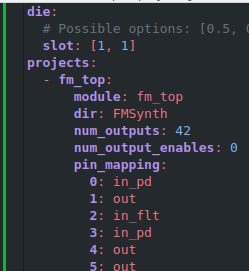
The idea is that you just specify a projects.yaml listing the projects you have, as well as having each LibreLane project in its own directory, and then the tool automatically clones the template repo, generates a top-level config, generates the multiplexer verilog source and runs the flow.{
"author": {
"avatarUrl": "2026-03_media/edae5aadf146133e0448bfb1f0fa91c4-62B19.png",
"discriminator": "0000",
"isBot": false
},
"message": {}
}message-1484520861955522710
2026-03-20T11:55:54.554+00:00 — Tholin (@tholin)
- Message ID:
1484520861955522710 - Author ID:
220639106915368960 - Nickname: Tholin
- User name: tholin
- Type:
Default - Discord message: https://discord.com/channels/1361349522684510449/1484494161003413656/1484520861955522710
- Archive source: https://discord.wafer.space/wafer-space/%E2%84%B9%EF%B8%8F%20-%20Information/general/ah-this-reminds-me-i-wanted-to-start/2026-03/2026-03.json
- Archive source: https://discord.wafer.space/wafer-space/Voice%20Channels/general/ah-this-reminds-me-i-wanted-to-start/2026-03/2026-03.json
Content
Attachments
- Resolved media URL: https://discord.wafer.space/wafer-space/%E2%84%B9%EF%B8%8F%20-%20Information/general/ah-this-reminds-me-i-wanted-to-start/2026-03/2026-03_media/image-30C93.png
[
  {
    "fileName": "image.png",
    "fileSizeBytes": 10434,
    "id": "1484520861632299158",
    "url": "2026-03_media/image-30C93.png"
  }
]{
"author": {
"avatarUrl": "2026-03_media/edae5aadf146133e0448bfb1f0fa91c4-62B19.png",
"discriminator": "0000",
"isBot": false
},
"message": {}
}message-1484520996898734123
2026-03-20T11:56:26.727+00:00 — Tholin (@tholin)
- Message ID:
1484520996898734123 - Author ID:
220639106915368960 - Nickname: Tholin
- User name: tholin
- Type:
Default - Discord message: https://discord.com/channels/1361349522684510449/1484494161003413656/1484520996898734123
- Archive source: https://discord.wafer.space/wafer-space/%E2%84%B9%EF%B8%8F%20-%20Information/general/ah-this-reminds-me-i-wanted-to-start/2026-03/2026-03.json
- Archive source: https://discord.wafer.space/wafer-space/Voice%20Channels/general/ah-this-reminds-me-i-wanted-to-start/2026-03/2026-03.json
Content
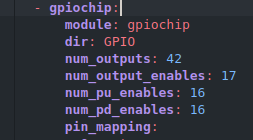
pin mapping is a long list showing how a design’s module outputs map to the pads when selected{
"author": {
"avatarUrl": "2026-03_media/edae5aadf146133e0448bfb1f0fa91c4-62B19.png",
"discriminator": "0000",
"isBot": false
},
"message": {}
}message-1484521124615159808
2026-03-20T11:56:57.177+00:00 — Tholin (@tholin)
- Message ID:
1484521124615159808 - Author ID:
220639106915368960 - Nickname: Tholin
- User name: tholin
- Type:
Default - Discord message: https://discord.com/channels/1361349522684510449/1484494161003413656/1484521124615159808
- Archive source: https://discord.wafer.space/wafer-space/%E2%84%B9%EF%B8%8F%20-%20Information/general/ah-this-reminds-me-i-wanted-to-start/2026-03/2026-03.json
- Archive source: https://discord.wafer.space/wafer-space/Voice%20Channels/general/ah-this-reminds-me-i-wanted-to-start/2026-03/2026-03.json
Content
You can actually map these connections arbitrarily{
"author": {
"avatarUrl": "2026-03_media/edae5aadf146133e0448bfb1f0fa91c4-62B19.png",
"discriminator": "0000",
"isBot": false
},
"message": {}
}message-1484521251824472195
2026-03-20T11:57:27.506+00:00 — Tholin (@tholin)
- Message ID:
1484521251824472195 - Author ID:
220639106915368960 - Nickname: Tholin
- User name: tholin
- Type:
Default - Discord message: https://discord.com/channels/1361349522684510449/1484494161003413656/1484521251824472195
- Archive source: https://discord.wafer.space/wafer-space/%E2%84%B9%EF%B8%8F%20-%20Information/general/ah-this-reminds-me-i-wanted-to-start/2026-03/2026-03.json
- Archive source: https://discord.wafer.space/wafer-space/Voice%20Channels/general/ah-this-reminds-me-i-wanted-to-start/2026-03/2026-03.json
Content
Consider this design, where I wish to save on signals by not having enables for every padAttachments
- Resolved media URL: https://discord.wafer.space/wafer-space/%E2%84%B9%EF%B8%8F%20-%20Information/general/ah-this-reminds-me-i-wanted-to-start/2026-03/2026-03_media/image-5F410.png
[
  {
    "fileName": "image.png",
    "fileSizeBytes": 7216,
    "id": "1484521251400581221",
    "url": "2026-03_media/image-5F410.png"
  }
]{
"author": {
"avatarUrl": "2026-03_media/edae5aadf146133e0448bfb1f0fa91c4-62B19.png",
"discriminator": "0000",
"isBot": false
},
"message": {}
}message-1484521359047655475
2026-03-20T11:57:53.07+00:00 — Tholin (@tholin)
- Message ID:
1484521359047655475 - Author ID:
220639106915368960 - Nickname: Tholin
- User name: tholin
- Type:
Default - Discord message: https://discord.com/channels/1361349522684510449/1484494161003413656/1484521359047655475
- Archive source: https://discord.wafer.space/wafer-space/%E2%84%B9%EF%B8%8F%20-%20Information/general/ah-this-reminds-me-i-wanted-to-start/2026-03/2026-03.json
- Archive source: https://discord.wafer.space/wafer-space/Voice%20Channels/general/ah-this-reminds-me-i-wanted-to-start/2026-03/2026-03.json
Content
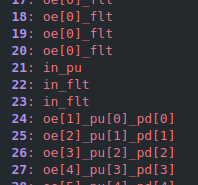
Which I can then map like thisAttachments
- Resolved media URL: https://discord.wafer.space/wafer-space/%E2%84%B9%EF%B8%8F%20-%20Information/general/ah-this-reminds-me-i-wanted-to-start/2026-03/2026-03_media/image-0D154.png
[
  {
    "fileName": "image.png",
    "fileSizeBytes": 5068,
    "id": "1484521358770573483",
    "url": "2026-03_media/image-0D154.png"
  }
]{
"author": {
"avatarUrl": "2026-03_media/edae5aadf146133e0448bfb1f0fa91c4-62B19.png",
"discriminator": "0000",
"isBot": false
},
"message": {}
}message-1484521592942886962
2026-03-20T11:58:48.835+00:00 — Tholin (@tholin)
- Message ID:
1484521592942886962 - Author ID:
220639106915368960 - Nickname: Tholin
- User name: tholin
- Type:
Default - Discord message: https://discord.com/channels/1361349522684510449/1484494161003413656/1484521592942886962
- Archive source: https://discord.wafer.space/wafer-space/%E2%84%B9%EF%B8%8F%20-%20Information/general/ah-this-reminds-me-i-wanted-to-start/2026-03/2026-03.json
- Archive source: https://discord.wafer.space/wafer-space/Voice%20Channels/general/ah-this-reminds-me-i-wanted-to-start/2026-03/2026-03.json
Content
If the number of outputs of a design is equal to the total number of outputs available, there is a special shorthand syntax where you just type "out" for a 1:1 mapping, such that
```
1: out[1]
2: out[2]
3: out[3]
```
is equivalent to just
```
1: out
2: out
3: out
```{
"author": {
"avatarUrl": "2026-03_media/edae5aadf146133e0448bfb1f0fa91c4-62B19.png",
"discriminator": "0000",
"isBot": false
},
"message": {}
}message-1484521747649921066
2026-03-20T11:59:25.72+00:00 — Tholin (@tholin)
- Message ID:
1484521747649921066 - Author ID:
220639106915368960 - Nickname: Tholin
- User name: tholin
- Type:
Default - Discord message: https://discord.com/channels/1361349522684510449/1484494161003413656/1484521747649921066
- Archive source: https://discord.wafer.space/wafer-space/%E2%84%B9%EF%B8%8F%20-%20Information/general/ah-this-reminds-me-i-wanted-to-start/2026-03/2026-03.json
- Archive source: https://discord.wafer.space/wafer-space/Voice%20Channels/general/ah-this-reminds-me-i-wanted-to-start/2026-03/2026-03.json
Content
If you have less outputs, you need an explicit mapping, though{
"author": {
"avatarUrl": "2026-03_media/edae5aadf146133e0448bfb1f0fa91c4-62B19.png",
"discriminator": "0000",
"isBot": false
},
"message": {}
}message-1484521910829318306
2026-03-20T12:00:04.625+00:00 — Tholin (@tholin)
- Message ID:
1484521910829318306 - Author ID:
220639106915368960 - Nickname: Tholin
- User name: tholin
- Type:
Default - Discord message: https://discord.com/channels/1361349522684510449/1484494161003413656/1484521910829318306
- Archive source: https://discord.wafer.space/wafer-space/%E2%84%B9%EF%B8%8F%20-%20Information/general/ah-this-reminds-me-i-wanted-to-start/2026-03/2026-03.json
- Archive source: https://discord.wafer.space/wafer-space/Voice%20Channels/general/ah-this-reminds-me-i-wanted-to-start/2026-03/2026-03.json
Content
As for inputs, there is no mapping. Every design receives all available inputs always.{
"author": {
"avatarUrl": "2026-03_media/edae5aadf146133e0448bfb1f0fa91c4-62B19.png",
"discriminator": "0000",
"isBot": false
},
"message": {}
}message-1484521981117468837
2026-03-20T12:00:21.383+00:00 — Tholin (@tholin)
- Message ID:
1484521981117468837 - Author ID:
220639106915368960 - Nickname: Tholin
- User name: tholin
- Type:
Default - Discord message: https://discord.com/channels/1361349522684510449/1484494161003413656/1484521981117468837
- Archive source: https://discord.wafer.space/wafer-space/%E2%84%B9%EF%B8%8F%20-%20Information/general/ah-this-reminds-me-i-wanted-to-start/2026-03/2026-03.json
- Archive source: https://discord.wafer.space/wafer-space/Voice%20Channels/general/ah-this-reminds-me-i-wanted-to-start/2026-03/2026-03.json
Content
This solution has worked for me for many tapeouts{
"author": {
"avatarUrl": "2026-03_media/edae5aadf146133e0448bfb1f0fa91c4-62B19.png",
"discriminator": "0000",
"isBot": false
},
"message": {}
}message-1484522748779827241
2026-03-20T12:03:24.408+00:00 — Tholin (@tholin)
- Message ID:
1484522748779827241 - Author ID:
220639106915368960 - Nickname: Tholin
- User name: tholin
- Type:
Default - Discord message: https://discord.com/channels/1361349522684510449/1484494161003413656/1484522748779827241
- Archive source: https://discord.wafer.space/wafer-space/%E2%84%B9%EF%B8%8F%20-%20Information/general/ah-this-reminds-me-i-wanted-to-start/2026-03/2026-03.json
- Archive source: https://discord.wafer.space/wafer-space/Voice%20Channels/general/ah-this-reminds-me-i-wanted-to-start/2026-03/2026-03.json
Content
(And, of course, the syntax of `in_pu` just means constant input with pull-up){
"author": {
"avatarUrl": "2026-03_media/edae5aadf146133e0448bfb1f0fa91c4-62B19.png",
"discriminator": "0000",
"isBot": false
},
"message": {}
}message-1484522838122827939
2026-03-20T12:03:45.709+00:00 — Tholin (@tholin)
- Message ID:
1484522838122827939 - Author ID:
220639106915368960 - Nickname: Tholin
- User name: tholin
- Type:
Default - Discord message: https://discord.com/channels/1361349522684510449/1484494161003413656/1484522838122827939
- Archive source: https://discord.wafer.space/wafer-space/%E2%84%B9%EF%B8%8F%20-%20Information/general/ah-this-reminds-me-i-wanted-to-start/2026-03/2026-03.json
- Archive source: https://discord.wafer.space/wafer-space/Voice%20Channels/general/ah-this-reminds-me-i-wanted-to-start/2026-03/2026-03.json
Content
The syntax is pretty simple. Its just a list of attributes separated by underscores{
"author": {
"avatarUrl": "2026-03_media/edae5aadf146133e0448bfb1f0fa91c4-62B19.png",
"discriminator": "0000",
"isBot": false
},
"message": {}
}message-1484523140595060887
2026-03-20T12:04:57.824+00:00 — Tholin (@tholin)
- Message ID:
1484523140595060887 - Author ID:
220639106915368960 - Nickname: Tholin
- User name: tholin
- Type:
Default - Discord message: https://discord.com/channels/1361349522684510449/1484494161003413656/1484523140595060887
- Archive source: https://discord.wafer.space/wafer-space/%E2%84%B9%EF%B8%8F%20-%20Information/general/ah-this-reminds-me-i-wanted-to-start/2026-03/2026-03.json
- Archive source: https://discord.wafer.space/wafer-space/Voice%20Channels/general/ah-this-reminds-me-i-wanted-to-start/2026-03/2026-03.json
Content
Attachments
- Resolved media URL: https://discord.wafer.space/wafer-space/%E2%84%B9%EF%B8%8F%20-%20Information/general/ah-this-reminds-me-i-wanted-to-start/2026-03/2026-03_media/projects-FBC0B.yaml
[
  {
    "fileName": "projects.yaml",
    "fileSizeBytes": 3141,
    "id": "1484523140297003068",
    "url": "2026-03_media/projects-FBC0B.yaml"
  }
]{
"author": {
"avatarUrl": "2026-03_media/edae5aadf146133e0448bfb1f0fa91c4-62B19.png",
"discriminator": "0000",
"isBot": false
},
"message": {}
}message-1484523352138715187
2026-03-20T12:05:48.26+00:00 — Tholin (@tholin)
- Message ID:
1484523352138715187 - Author ID:
220639106915368960 - Nickname: Tholin
- User name: tholin
- Type:
Default - Discord message: https://discord.com/channels/1361349522684510449/1484494161003413656/1484523352138715187
- Archive source: https://discord.wafer.space/wafer-space/%E2%84%B9%EF%B8%8F%20-%20Information/general/ah-this-reminds-me-i-wanted-to-start/2026-03/2026-03.json
- Archive source: https://discord.wafer.space/wafer-space/Voice%20Channels/general/ah-this-reminds-me-i-wanted-to-start/2026-03/2026-03.json
Content
TODO: allow the placement of arbitrary macros with connections between them so you can, for instance, have SRAM macros on your multi-project die{
"author": {
"avatarUrl": "2026-03_media/edae5aadf146133e0448bfb1f0fa91c4-62B19.png",
"discriminator": "0000",
"isBot": false
},
"message": {}
}message-1484545377691500585
2026-03-20T13:33:19.561+00:00 — Tholin (@tholin)
- Message ID:
1484545377691500585 - Author ID:
220639106915368960 - Nickname: Tholin
- User name: tholin
- Type:
Default - Discord message: https://discord.com/channels/1361349522684510449/1484494161003413656/1484545377691500585
- Archive source: https://discord.wafer.space/wafer-space/%E2%84%B9%EF%B8%8F%20-%20Information/general/ah-this-reminds-me-i-wanted-to-start/2026-03/2026-03.json
- Archive source: https://discord.wafer.space/wafer-space/Voice%20Channels/general/ah-this-reminds-me-i-wanted-to-start/2026-03/2026-03.json
Content
Is there any python library I can use to help me procedurally generate code, or is there some preferred way to do this?{
"author": {
"avatarUrl": "2026-03_media/edae5aadf146133e0448bfb1f0fa91c4-62B19.png",
"discriminator": "0000",
"isBot": false
},
"message": {}
}